


Written by: Bryan Grobstein, Vice President, Global Revenue, AnyRoad
Key Takeaways
- Traditional depletion reports miss contact data for over two-thirds of tasting attendees, so most potential customers remain anonymous.
- A repeatable QR-code check-in workflow captures first-party records tied to receipt-verified purchases without requiring POS integration.
- A five-step guest flow, from QR scan to SMS cashback or sweepstakes, connects experiential spend directly to retail sell-through.
- Prerequisites such as AnyRoad Front Desk access, licensed retail partners, state-specific age verification, and connectivity testing must be confirmed before deployment.
- AnyRoad turns ambassador tastings into measurable retail outcomes; see the full QR workflow in action in a live demo.
Before You Begin: Compliance-Ready Setup
Confirm several prerequisites before deploying QR code check-in at an ambassador tasting.
- AnyRoad Front Desk app access: Install and authenticate the iOS app on at least one device per check-in station. Use a backup device for high-volume activations.
- Licensed retail partner for transactional paths: AnyRoad acts as the brand's agent and is not a licensed retailer or wholesaler. Any cashback rebate or sweepstakes mechanic that involves a product purchase must route through a compliant transactional path. Confirm that the retail account or on-premise venue holds the correct license for the state where the event occurs.
- State-specific age verification rules: Every US state requires alcohol retailers and servers to verify that a buyer is at least 21 years old before completing a sale or serving alcohol, including at tastings and events. AnyRoad's integrated ID scanning supports embedded age verification at check-in, but operators must confirm which forms of identification are legally accepted in the event state. State-specific mobile ID solutions such as Maryland's Mobile ID Check by MD app support Age 21+ verification via QR code scan or NFC, but these are not national standards, so multi-state operators must verify local rules for each deployment.
- Connectivity testing: QR check-in systems require confirmed connectivity of at least 5 Mbps dedicated wired internet at entry points, as venue WiFi can fail under simultaneous connections from 200 attendees. Test the full scan-to-submission flow on actual venue hardware at least 24 hours before the event.
- Offline fallback: Configure the Front Desk app's offline mode so the attendee roster is stored locally and scans queue for sync when connectivity returns. Maintain a printed alphabetical guest list as a last resort.
One prerequisite deserves special emphasis: alcohol compliance requires that age gates reflect actual verification, not self-attestation. A simple age gate or self-attestation checkbox does not satisfy legal requirements for alcohol service or sales, where businesses must confirm age using valid government-issued identification. AnyRoad's integrated ID scanning creates an auditable compliance record at the point of check-in.
Step-by-Step Tutorial: Guest QR Code Check In
This sequence outlines the guest-side experience at an ambassador tasting station equipped with AnyRoad Front Desk.

- Open camera: On iPhones running iOS 11 or later, guests open the native Camera app and point it at the QR code for one to two seconds; most Android devices with built-in camera QR scanning work the same way with no separate app required. No dedicated app download is required.
- Scan the code: The guest taps the notification banner that appears. The browser opens a mobile-friendly registration form hosted by AnyRoad. The entire process occurs in the customer's browser and achieves adoption rates above 90% when implemented correctly.
- Register: The guest enters name, email or phone number, and any custom fields configured by the brand. A 3-field form for QR-sourced traffic at events typically converts 30–50% higher than a 7-field form on the same audience, as each additional required field reduces completion rates for mobile users. Keep the form short to protect conversion.
- Age verification: If the brand has configured ID scanning, the guest is prompted to present a government-issued ID. The Front Desk app reads the date of birth, confirms the guest is 21 or older, and logs the verification with a timestamp while avoiding retention of unnecessary personal data.
- Confirmation: A green confirmation screen appears and the attendee is marked present in the live dashboard. The guest simultaneously receives an SMS containing a cashback rebate or sweepstakes entry linked to an eligible SKU. That message initiates the post-tasting purchase conversion path.
Step-by-Step Tutorial: Brand Setup in AnyRoad Front Desk
Generate the Event QR Code for Each Placement
Inside AnyRoad's Experience Manager, create the ambassador tasting activation and generate a dynamic QR code tied to that event record. Dynamic QR codes are preferred because they allow updating the destination URL after materials are printed and provide real-time scan tracking of unique scans, total scans, timestamps, and device types. Assign a unique code to each tasting station or retail account location so you can compare per-placement performance without manual spreadsheets.
Configure ID Scanning for Age Verification
In the Front Desk app settings, enable integrated ID scanning and set the minimum age threshold to 21. ID scanning systems typically read the holder's date of birth, the ID's expiration date, document type, state of issue, and a unique document number from government-issued IDs. Because these systems capture sensitive personal information, you must decide what to retain. Configure data retention to store only the age-verification result and timestamp, not the full ID record, to reduce data liability while maintaining an auditable compliance log. For multi-state deployments, review the accepted ID types for each state before the event date.
Activate FullView to Capture Every Guest
Enable AnyRoad's FullView feature so that every individual at a group tasting, not just the person who initiated the scan, can register. Proximo Spirits found that before implementing FullView they were missing contact information for over 66% of their guests. After activation they immediately began collecting 69% more guest data and 34% more NPS responses. FullView is the mechanism that closes the two-thirds gap that depletion-only reporting leaves open.
See FullView configuration in action for ambassador tasting activations.
Set Up SMS Cashback or Sweepstakes Mechanics
Configure the post-registration SMS in AnyRoad's Lifetime Loyalty settings. Two mechanics are available.
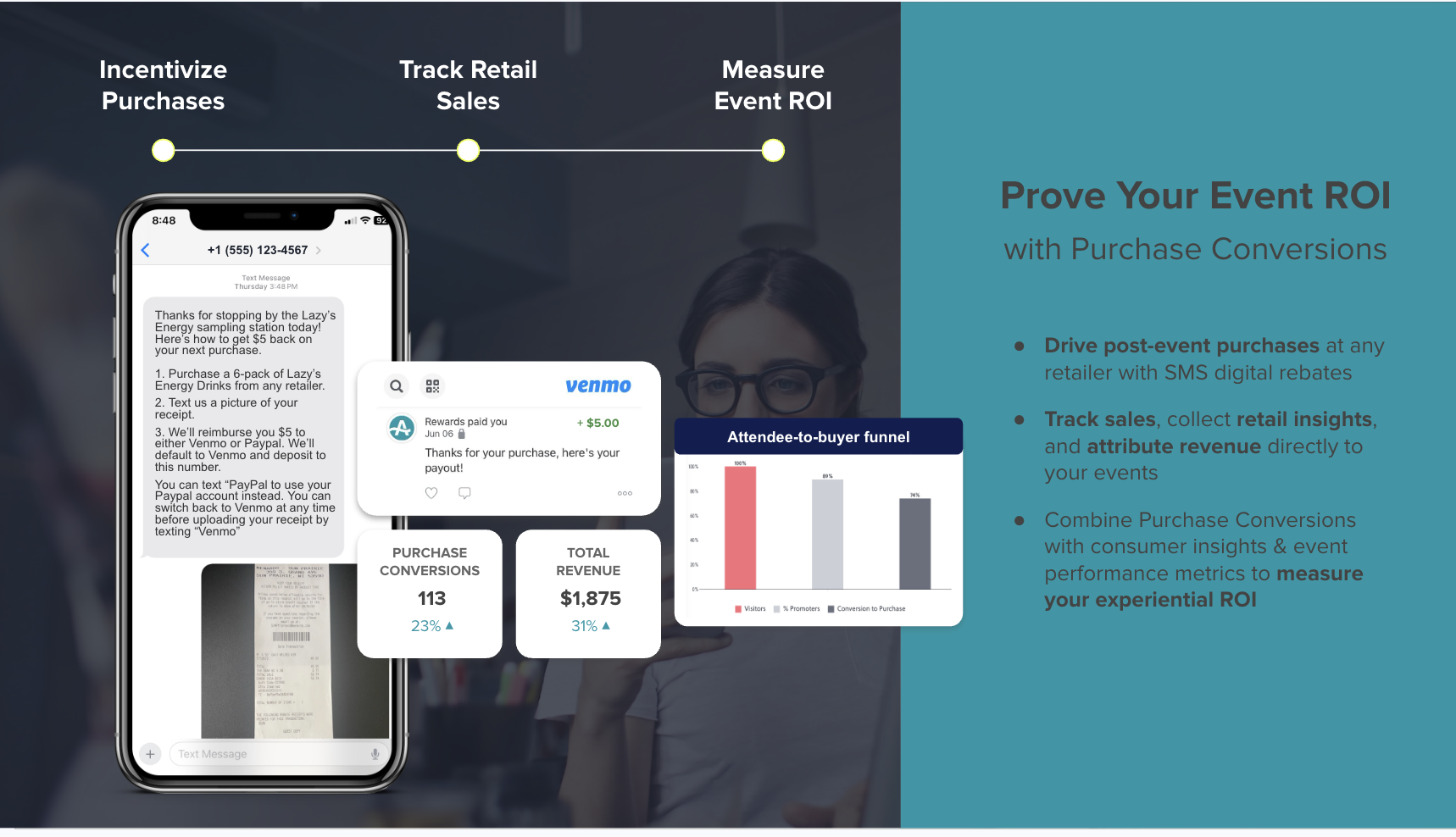
- Cashback rebate: The guest receives an SMS with a rebate redeemable anywhere the product is sold. They purchase the bottle, photograph the receipt, and text it back. AnyRoad's AI reads the receipt, confirms the eligible SKU, and pays the rebate via Venmo or PayPal. No POS integration is required at the retail account.
- Sweepstakes entry: The same SMS flow delivers a prize entry instead of cash. AnyRoad handles regulatory compliance including terms and conditions and privacy policies.
Both mechanics produce a first-party record tied to a receipt-verified purchase, which connects the activation to retail sell-through. In a one-month ambassador tasting pilot with a single unnamed craft brand on a small dataset, 56% of the records collected converted to a bottle purchase. That result illustrates the potential of the mechanic rather than a platform-wide benchmark.
Connect Records to PinPoint AI and Atlas Insights
Every check-in record, survey response, and receipt submission flows automatically into Atlas Insights, AnyRoad's analytics dashboard. PinPoint AI analyzes open-text feedback from post-tasting surveys to surface themes, sentiment drivers, and actionable suggestions without manual review. Field marketing leads can filter results by activation location, date, and SKU to identify which tasting stations and retail accounts are producing the strongest conversion rates and brand affinity scores.

Explore Atlas Insights and PinPoint AI applied to ambassador tasting data.
Operational Considerations for Live Events
Handling Walk-In Guests at the Station
Guests who approach a tasting station without a prior registration record are handled directly through the QR scan flow. The same code that pre-registered guests use also serves as the walk-in registration entry point. Walk-in registration captured directly in the app creates the same unified record and data trail used for pre-registered guests so post-event reports remain consistent. Ambassadors should be coached to direct every walk-in to the QR code before pouring.
Managing Multi-State Events and Rules
Age verification rules, accepted ID types, and cashback rebate compliance requirements vary by state. Before deploying the same QR workflow across multiple states, confirm that the ID scanning configuration and SMS mechanic terms comply with each state's alcohol service laws. AnyRoad's sweepstakes compliance support covers terms and conditions and privacy policies, but operators retain responsibility for confirming local alcohol service rules with licensed counsel.
Exporting Data to CRM and Marketing Tools
All attendee records, scan timestamps, and receipt submissions are exportable from Atlas Insights to CSV or via API to connected CRM and marketing automation platforms including HubSpot, Klaviyo, and Salesforce. POPLIFE generated detailed reports on event success in around 20 minutes using AnyRoad's automated reporting and centralized data, replacing the manual spreadsheet process that previously followed activations.
Offline Fallback During Connectivity Drops
The Front Desk app stores the attendee roster locally and queues scans when connectivity drops, syncing automatically when the connection returns. A check-in station should follow a three-layer setup: scanning device with app open, live attendee list on the device, and printed backup list, so that app failure or connectivity loss does not create entry queues.
Common Mistakes and Troubleshooting
Resolving Duplicate Scans
If a code has already been scanned, the system flags it to prevent duplicate entry. Ambassadors should not override duplicate alerts without manager approval. If a guest claims they have not yet registered, use the name-search fallback in the Front Desk app to locate their record before creating a new one.
Fixing Connectivity Issues on Site
Event organizers must test the complete scan-to-submission flow on actual venue hardware and network at least 24 hours before the event, rather than only on office equipment, to account for differences in browser behavior and connectivity. If venue WiFi is unreliable, use a dedicated mobile hotspot with a minimum 5 Mbps connection at each check-in station.
Managing Compliance Edge Cases
Most states impose dram shop liability, allowing businesses to be sued for damages caused by serving alcohol to an underage or overserved customer, making documented age verification essential for legal defense. If a guest cannot present a valid government-issued ID, the ambassador must decline to serve alcohol regardless of the guest's apparent age. The Front Desk app's age-verification log provides the auditable record needed for compliance defense.
Measuring Success from Scan to Sale
The metrics that matter for ambassador tasting QR code check-in fall into two categories: immediate data capture and downstream retail conversion.
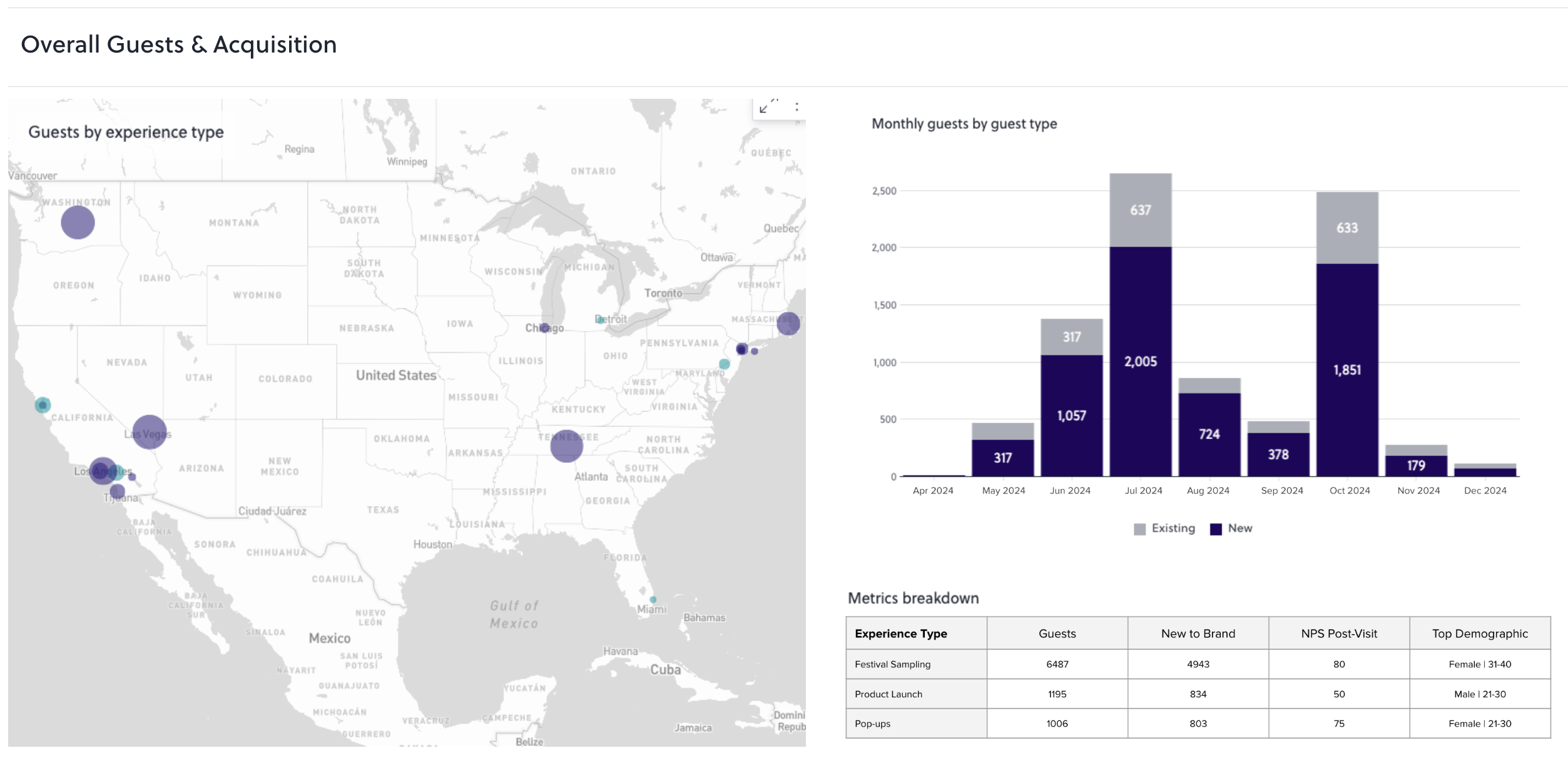
Immediate data capture metrics include:
- Total unique scans per activation
- Registration completion rate (scans that result in a submitted form)
- Age-verification pass rate
- SMS opt-in rate
- NPS and brand affinity scores from post-tasting surveys
Downstream retail conversion metrics include:
- Receipt submission rate (the share of SMS recipients who photograph and submit a receipt)
- SKU-level conversion rate by activation location
- Second-visit rate among registered attendees
- Lifetime value progression from single-bottle purchaser to club member
The lifetime value math is straightforward: a single retail bottle purchase is worth roughly $100 to a brand, while a club member who stays through six releases is worth roughly $600. AnyRoad's data shows that a consumer who visits a distillery twice is 512% more likely to convert into a paid loyalty enrollment. The ambassador tasting is the first visit in that sequence, and the QR check-in record makes it possible to identify those guests and invite them back.
Conversate Collective used AnyRoad at field marketing events for a CPG beauty brand and found that 74% of guests were more likely to purchase the brand's products after attending, with over 50% of surveyed consumers identifying specific retail locations where they bought the product. That is the kind of retail lift data that a depletion report cannot produce.
See how tasting records connect to purchase data in Atlas Insights.
Advanced Tips for Higher Conversion
Teams ready to move beyond basic check-in can use these approaches to extend the value of every scan.
- Assign unique QR codes per placement: Assigning a unique QR code to each ambassador tasting placement enables per-placement performance analysis, comparing in-store displays, event signage, or other activations without relying on manual spreadsheets. Use this data in Atlas Insights to identify which retail accounts and tasting formats produce the highest conversion rates.
- Set a 30-day attribution window: Setting a 7-day or 30-day attribution window for QR code conversions accounts for delayed actions, such as a consumer scanning at a tasting event and purchasing later at retail. Configure the cashback SMS to remain redeemable for 30 days to capture delayed conversions.
- Use PinPoint AI to refine the tasting experience: Route post-tasting survey responses through PinPoint AI to identify which flavor notes, ambassador talking points, and experience elements drive the highest NPS and purchase intent scores. Apply those findings to ambassador training before the next activation cycle.
- Segment high-value guests for club enrollment: Atlas Insights allows brands to filter registered attendees by NPS score, spend, and visit frequency. Guests who scan at a tasting, submit a receipt, and return for a second visit are the cohort most likely to convert to a Bottle Club membership, the segment worth roughly $600 in lifetime value versus $100 for a single purchase.
- Test form length with dynamic QR codes: Dynamic QR codes allow tasting-room managers to A/B test landing pages, shorten forms, or change post-scan flows for ambassador events without reprinting codes, enabling iteration on conversion performance after deployment.
FAQ
How does AnyRoad handle walk-in guests who did not pre-register for the ambassador tasting?
Walk-in guests use the same QR code displayed at the tasting station. Scanning it opens the mobile registration form in their browser, where they complete their details on the spot. The record created is identical to a pre-registration record and flows into the same Atlas Insights dashboard, so post-event reports reflect total attendance rather than only pre-booked guests. Ambassadors should be trained to direct every walk-in to the QR code before the tasting begins.
What age verification options does AnyRoad support for alcohol tastings?
AnyRoad's Front Desk app includes integrated ID scanning that reads the date of birth and expiration date from a government-issued ID, confirms the guest is 21 or older, and logs the verification with a timestamp. The system is configurable to store only the age-verification result rather than the full ID record, reducing data liability while maintaining an auditable compliance log. Because age verification rules and accepted ID types vary by state, operators should confirm local requirements before each deployment. AnyRoad acts as the brand's agent in this process and does not serve as a licensed retailer or wholesaler.
Does the cashback rebate mechanic require POS integration at the retail account?
No. The entire mechanic runs on the receipt. After registering at the tasting, the guest receives an SMS with a cashback rebate redeemable anywhere the product is sold. They purchase the bottle, photograph the receipt, and text it back. AnyRoad's AI reads the receipt, confirms the eligible SKU, and pays the rebate via Venmo or PayPal. No retailer or bar is asked to integrate any system, which makes the mechanic deployable across trade accounts at scale, including on-premise venues where a bar tab line item for a specific SKU becomes a measurable conversion event.
How does AnyRoad capture data from every attendee in a group, not just the person who scanned?
AnyRoad's FullView feature enables every individual in a group to register independently, even when one person initiated the check-in. After the primary guest scans and registers, additional guests in the party are prompted to complete their own registration through the same mobile flow. This addresses the data gap described earlier, where depletion reports miss contact information for most attendees. This is the same mechanism that delivered the 69% guest data increase mentioned earlier for Proximo Spirits.
What happens to the data after the tasting, and how does it connect to retail lift measurement?
Every check-in record, survey response, and receipt submission flows automatically into Atlas Insights. Field marketing leads can filter results by activation location, date, and SKU to measure registration completion rates, SMS opt-in rates, receipt submission rates, and SKU-level conversion by account. PinPoint AI analyzes open-text survey feedback to surface sentiment themes and experience drivers without manual review. For brands running Bottle Club or Premium Membership programs, the same attendee records can be segmented by NPS, visit frequency, and spend to identify guests who are most likely to convert to paid recurring enrollment, the higher-value cohort described in the measurement section.
Conclusion: Turning Tastings into Measurable Revenue
Ambassador tastings that rely on depletion reports leave the majority of attendees uncaptured and retail impact unmeasured. A QR-code check-in workflow built on AnyRoad Front Desk changes that from the first scan. Every guest registers, age verification is documented, FullView captures the full group, and an SMS cashback or sweepstakes mechanic initiates the path to a receipt-verified purchase. The resulting records feed PinPoint AI and Atlas Insights, connecting experiential spend to retail sell-through without POS integration at any account.
The operational sequence is repeatable across retail accounts, on-premise venues, and multi-state deployments. The compliance layer is built in. The measurement runs automatically. What was previously a depletion report becomes a first-party database, a receipt-verified conversion record, and the foundation for identifying the guests most likely to become high-value club members.
See how every scan becomes a measurable retail outcome with AnyRoad.