


Written by: Bryan Grobstein, Vice President, Global Revenue, AnyRoad | Last updated: October 17, 2026
Key Takeaways
- Offline-first architecture protects brand activations from venue Wi-Fi and cellular failures by writing every record to local storage before syncing.
- Staff-facing native apps handle offline capture more reliably than attendee-facing QR forms because native apps commit data locally as soon as staff confirm a check-in.
- Common failure modes that lose data include duplicate records on reconnect, missing consent when network calls fail, and incomplete group capture when only the booker’s details are recorded.
- Buyers should run a live offline test in airplane mode that covers check-in, consent, ID verification, surveys, and group capture before signing any contract.
- AnyRoad’s Front Desk iOS app and FullView feature support consumer activations that must capture first-party data reliably even when connectivity drops.
What Offline Functionality Means For Brand Activations
Offline functionality for brand activations splits into staff-facing capture and attendee-facing capture, and each behaves differently when connectivity fails.
Staff-facing offline capture runs through a native app, such as AnyRoad's Front Desk iOS app, that handles QR check-in, on-site payments, digital waivers, and ID scanning. A native app writes every action immediately to a local store on the device. In an offline-first architecture, the local data store is the canonical source of truth that the interface reads from exclusively, while the network acts only as a second data source used to update the local store. The device confirms a check-in without waiting for a network response, and the record exists on-device the moment the staff member taps confirm.

Attendee-facing offline capture is a different problem. Browser forms and QR registration flows that open a web page when a guest scans a code often silently require a connection to load or submit. Browser-based capture tools can cache a form page for offline display, but form submissions almost universally require a network connection, and submissions made during an outage may be lost or stored in a browser cache that is not guaranteed to survive a page refresh, device restart, or session timeout.
The outbox queue is the mechanism that makes staff-facing capture reliable. Offline mutations enter a durable queue and are replayed through background synchronization when connectivity returns. Each queued record carries a stable client-generated identifier so the server can apply it exactly once, a property called idempotency, which prevents duplicate records on reconnect. The entity state change and its durable mutation-queue record must commit atomically in a single local transaction. If the screen updates first and the queue record is appended asynchronously, process death leaves the change visible locally with nothing left to deliver it. Consent capture follows the same rule. The consent language, the checkbox state, and the timestamp must be written to local storage at the moment of capture, with no dependency on a network call.
Where Brand Activations Commonly Lose Data
Most data loss at consumer brand activations comes from a small set of offline failure modes. These differ from trade-show environments because nobody pre-registered, consent must be captured fresh, and age verification is often a legal requirement.
- Venue Wi-Fi and cellular dead zones. Outdoor event venues typically lack fixed infrastructure and suffer cellular congestion when thousands of attendees connect simultaneously; nearby cell towers can be overwhelmed by thousands of simultaneous connection attempts, resulting in slow or non-functional mobile data for everyone in the area. Festivals, pop-ups, and mobile tours are exactly the environments where this happens.
- QR forms that require a connection to load or submit. A guest scans a code, the form never loads, and the interaction disappears. No record exists and no consent is captured.
- Duplicate records created on reconnect. When a device reconnects and replays queued writes without stable client-generated IDs, the server creates a second record for the same guest. Replaying non-idempotent operations is a data-integrity bug: replaying "set status to done" twice is harmless, but replaying "increment stock by 3" twice double-counts.
- Consent and age-verification gaps. When the consent step depends on a network call to validate or store the record, a connectivity drop at that moment produces a check-in with no consent record, which creates a compliance exposure for regulated categories including alcohol.
- Group booking capture failure. When only the booker's details are captured, a group of six guests produces one record. AnyRoad's FullView feature addresses this directly by capturing data from every attendee in a group. Proximo Spirits found they were missing contact information for over 66% of their guests before implementing FullView, after which they immediately began collecting 69% more guest data and 34% more NPS responses.
- App kill mid-capture. If the app is force-closed or the device restarts before a record is committed to local storage, the capture disappears. A properly implemented outbox commits each record to permanent local storage at confirmation, so the record survives app crashes and device restarts.
How To Test A Platform's Offline Mode Before You Buy
Because a screen share or slide cannot prove offline behavior, run every step below on the actual device and app the vendor proposes. A useful evaluation proves a specific workflow on the devices and in the conditions your team actually has to support.
- Put the device in airplane mode and complete a full check-in from start to finish.
- Submit a survey response while offline, restore connectivity, and confirm the response syncs automatically without staff action.
- Register two guests in one group while offline and confirm both records appear after sync.
- Verify that consent language and its timestamp are stored locally and appear on the synced record.
- Reconnect mid-form and check the CRM or dashboard for duplicate records.
- Confirm ID scanning completes without a network connection.
- Kill the app mid-capture and reopen it, then confirm the in-progress record survived.
- Restore connectivity and confirm the outbox clears automatically, with no manual push required.
Run The Offline Test On Your Own Devices
Consumer Activation Platforms And Trade-Show Lead Scanners
Trade-show lead scanners and lead capture apps, such as Popl, BoothMaven, iCapture, Mobly, Captello, momencio, Blinq, and Lodago, are built for a specific workflow. Badge retrieval pulls pre-registered contact details such as name, company, title, email, and phone directly from the event organizer's registration database, and booth staff then add a short set of qualification fields. That workflow assumes a known attendee list, a badge, and a B2B sales context. It assumes no fresh consent capture, no age verification, and no group data collection.
Consumer activation platforms are built for the opposite scenario. Nobody pre-registered, so the brand must collect consent directly and may need to verify age. The data objective is a first-party consumer profile, not a sales lead. A consumer activation platform is the better fit when a brand must control the attendee-facing registration experience, collect permission directly, support consumer-oriented fields, or perform age and identity checks, because badge scans only prove physical presence and carry no intent or consent context.
General event platforms such as Splash focus on event marketing workflows, including invitation management, RSVP tracking, and brand-consistent event pages. They do not focus on offline consumer data capture at activations where connectivity is unreliable and age verification is required. iCapture is similarly positioned for trade-show and sales-team lead capture and not for consumer activation workflows. Buyers evaluating platforms for festivals, pop-ups, mobile tours, and ambassador tastings should self-select toward platforms built for that consumer-facing context and for offline capture.
For a deeper look at how first-party data flows from activations into broader marketing programs, see How To Capture First-Party Data At Brand Activations.
What An Offline Activation Workflow Looks Like End To End
A properly architected offline activation defines what staff do, what the device does, and what happens on reconnect.
When a guest arrives, a staff member opens AnyRoad's Front Desk iOS app, already in airplane mode because venue cellular is congested. The staff member scans the guest's ID, and the scan runs locally with no network request. The app verifies age on-device, then proceeds to check-in. The guest's details, consent language, consent timestamp, and check-in record are written atomically to local storage. The screen confirms the check-in, and the guest moves into the activation.

If the guest is part of a group, AnyRoad's FullView captures data from every attendee in the group at this point. Each individual record is written to local storage with its own stable client-generated ID.
During the activation, the guest completes a survey on the staff-operated device. The survey response is appended to the guest's local record and queued in the outbox.
When connectivity returns, the outbox replays queued records to the server in order. The server applies idempotency checks using the stable client-generated IDs, so no duplicate records appear. Consent records, survey responses, and check-in data arrive in the platform with their original capture timestamps. Post-activation, those records flow into CRM and reporting via AnyRoad's integrations with HubSpot, Salesforce, Klaviyo, and other systems, delivered through Webhooks, API, Zapier, or manual file transfer. For a full account of how integration works downstream, see Experiential Marketing Platform: Attendee Data & Integration. That workflow is the benchmark. The platforms below vary widely in how much of it they actually support offline, so compare each against the steps above.
A Qualitative Comparison Of Offline-Capable Platforms
Most offline-capable tools were built for ticketing, trade-show badge scanning, or B2B lead capture, not for walk-up consumer activations. The entries below show where each platform's offline strengths sit and where it falls short of a consumer activation workflow. Each is grounded in verifiable public descriptions, and no scores or rankings are assigned.
AnyRoad
- Best For: Consumer brand activations at festivals, pop-ups, mobile tours, tasting rooms, and ambassador tastings where check-in, ID and age verification, consent capture, and group data collection must work without connectivity.
- Offline Capabilities: Native iOS Front Desk app handles QR check-in, on-site payments, digital waivers, and ID scanning. FullView captures data from every attendee in a group, including each guest the booker brings. Configurable first-party data capture before, during, and after an experience. Platform holds AICPA SOC 2, PCI DSS 4.0, GDPR, and CCPA compliance.
- Watch-outs: Offline local storage, queueing, duplicate handling, and reconnect-sync behavior should be validated in a live demo test using the protocol above before signing. Attendee-facing QR flows should be tested separately from staff-facing app flows because they have different connectivity dependencies.
Eventify
- Best For: Branded event apps with attendee-facing features including agendas, networking, and check-in for managed events.
- Offline Capabilities: Eventify's check-in scanning app caches credentials and queues scans offline, then syncs check-in data to the cloud and updates dashboards once the device reconnects. This is separate from Eventify's branded app builder, which lets you customize and design your own branded event app.
- Watch-outs: Built primarily for managed events with pre-registered attendees. Consumer activation workflows that require ID scanning, age verification, and group capture are not a documented use case.
Nutickets
- Best For: On-site ticketing and POS for outdoor and low-connectivity environments including festivals and outdoor venues.
- Offline Capabilities: Nutickets' box office software includes an offline mode that lets cashiers and product vendors sell tickets and products over the counter and on the phone even when internet connectivity fails, alongside on-site POS and ticketing apps.
- Watch-outs: Positioned as a ticketing and access-control platform. First-party consumer data capture, consent management, and post-activation survey workflows are not its primary design target.
Bizzabo
- Best For: Enterprise event management with onsite check-in and deep CRM integration for B2B and corporate events.
- Offline Capabilities: Onsite check-in with Salesforce and HubSpot integration.
- Watch-outs: Designed for corporate and B2B event workflows. Consumer activation requirements such as walk-up registration, age verification, and offline group capture sit outside its documented scope.
BoothMaven
- Best For: B2B field marketing and trade-show lead capture via badge scanning, business card OCR, and manual entry.
- Offline Capabilities: Badge scans, business-card OCR, QR submissions, and manual entries complete entirely on-device without any network request, with each record written to permanent local storage the moment the rep taps Confirm. CRM sync defers until connectivity returns.
- Watch-outs: Built for staff-side B2B lead capture against known attendees. It does not address consumer consent capture from scratch, age verification, or group attendee data collection. Its QR capture is a rep-side capture path, not an attendee self-serve form.
Popl
- Best For: Digital business card sharing and individual lead capture for sales professionals and booth teams.
- Offline Capabilities: Offline capture per Popl's own claims; reviewers flag weak cellular service affecting the tap and share experience in large venues.
- Watch-outs: The core mechanic is a digital card share-back that requires the attendee to take an action on their own device. It is not designed for consumer activation workflows, consent capture, or age verification.
Survtapp
- Best For: Survey and feedback collection at events and in the field.
- Offline Capabilities: Offline survey capture with sync on reconnect per vendor claims.
- Watch-outs: A survey tool rather than a full activation platform. It does not address check-in, ID scanning, age verification, or group data capture as an integrated workflow.
Frequently Asked Questions
Does Offline Data Capture Work For Attendee-Facing QR Forms Or Only For Staff With An App?
The answer depends on the architecture behind the QR code. A QR code that opens a cloud-hosted browser form, such as Google Forms, Typeform, or an embedded HubSpot form, requires a network connection to load and to submit. If connectivity is unavailable, the form either fails to load or the submission is lost. A native app operated by staff writes every action to local storage on the device and queues it for sync, so it does not depend on a network connection at the moment of capture. Buyers running consumer activations where attendees self-register via QR should test that specific flow in airplane mode before relying on it at a festival or pop-up. Staff-operated native app capture remains the more reliable path for activations in low-connectivity environments.
What Happens To Duplicate Records When A Device Reconnects?
In a properly implemented offline-first architecture, each queued record carries a stable client-generated identifier, typically a UUID, that the server uses as an idempotency key. When the device reconnects and the outbox replays queued operations, the server checks the identifier before applying the write. If the same identifier has already been processed, the server returns the earlier result instead of creating a second record. This behavior prevents the duplicate-on-reconnect failure mode. Buyers should ask vendors to demonstrate this behavior explicitly during a demo. Capture a record offline, reconnect, and confirm that only one record appears in the dashboard or CRM. Platforms that do not implement stable client-generated IDs will create duplicates on retry.
Can Consent And Age Verification Be Captured While Offline?
Consent and age verification can be captured offline when the platform writes consent data to local storage at the moment of capture instead of deferring it to a network call. A correctly implemented offline consent capture stores the consent language, the checkbox or signature state, and the timestamp atomically with the guest record on the device. Age verification via ID scanning should similarly run locally without requiring a network lookup to complete the check. Buyers in regulated categories, especially alcohol brands, should verify that the consent record and its timestamp appear on the synced record in the CRM, not only on the device. AnyRoad's Front Desk iOS app includes integrated ID scanning for embedded age verification, designed to meet compliance requirements for regulated industries.
How Is A Consumer Activation Platform Different From A Trade-Show Lead Scanner?
As covered above, badge scanners assume a pre-registered attendee, while consumer activation platforms capture consent and age verification from scratch. This difference creates distinct data models, consent requirements, and offline risk profiles. A trade-show lead scanner does not fit a spirits brand running a festival activation where guests walk up, try a product, and need to be enrolled in a marketing database with documented consent.
How Long Should An Offline Pilot Run Before Signing A Contract?
Once you have confirmed that a platform is built for consumer activations, the next question is how long to test it before committing. A meaningful pilot should cover at least one full activation in the actual venue type, such as an outdoor festival, pop-up, or mobile tour, where connectivity is genuinely unreliable. The pilot should include a deliberate connectivity test. Put devices in airplane mode at the start of a session, run the full workflow including check-in, consent, ID verification, and survey, restore connectivity, and audit the synced records against what was captured on-device. Four to eight weeks is a reasonable window to cover at least one live activation plus post-event CRM reconciliation. Define pass and fail criteria before the pilot begins, including minimum sync success rate, absence of duplicate records, consent timestamp accuracy, and group capture completeness. A vendor that resists a live offline test during the demo evaluation signals that its offline claim has not been validated under real conditions.
From Offline Capture To CRM And Post-Activation Reporting
Offline-captured records create value only after they reach the systems that act on them. Once AnyRoad's outbox syncs, records flow into CRM, marketing automation, and analytics via AnyRoad's integrations with HubSpot, Salesforce, Klaviyo, and other platforms, delivered through Webhooks, API, Zapier, or manual file transfer. Every record carries its original capture timestamp, consent status, survey responses, and group membership data, preserving the full context of the activation interaction.
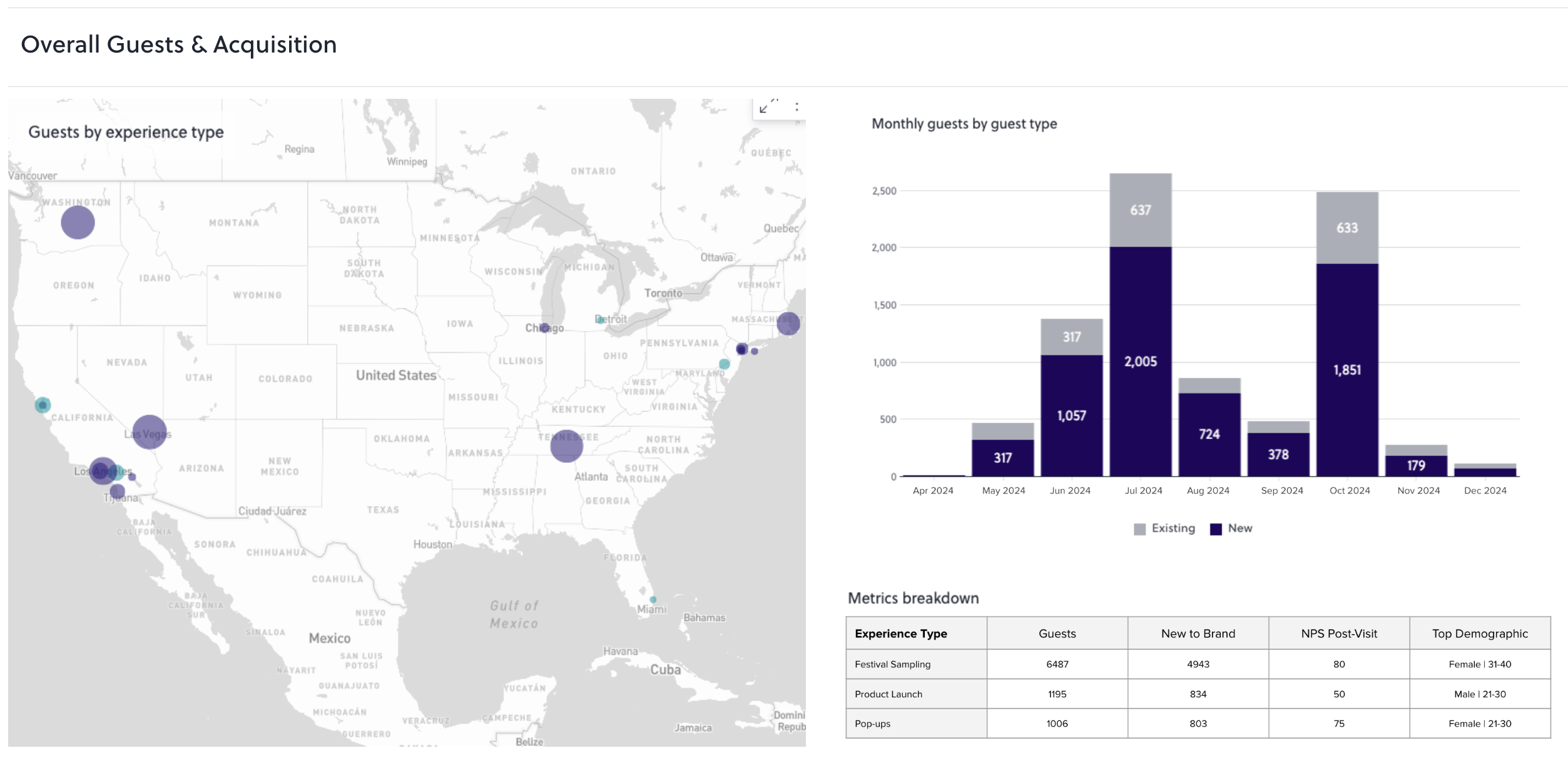
The downstream impact is measurable. The Proximo Spirits lift noted earlier, 69% more guest data, starts with records that survive the connectivity gap. Diageo saw a 16-point NPS increase using AnyRoad analytics to customize flavor profiles across its distillery experiences. These outcomes begin with a reliable offline capture architecture, where records exist on-device regardless of connectivity, queue cleanly, and arrive in reporting without gaps or duplicates.
For the full workflow connecting activation data to CRM and post-event reporting, see Real-Time Attendee Data Capture Platform: A Buyer's Guide and Event Attendee Data Capture: A Workflow For Alcohol Brands.
See How AnyRoad Captures Guest Data Offline